
What is DTF Printing? The Ultimate Guide to Direct-to-Film
Table of Contents
- What is DTF Printing? The Basics Explained
- How Does DTF Printing Work? The 5-Step Process
- What Supplies and Equipment Do You Need for DTF?
- DTF vs. DTG vs. Screen Printing: Which is Better?
- The Pros and Cons of DTF Printing
- Is DTF Printing Profitable? A Quick Cost Analysis
- The Most Popular Questions About DTF Printing
- Ready to Start Printing with DTF?
The custom clothing sector is evolving rapidly. Consumers now want eye-catching patterns on all sorts of materials—not only 100% cotton t-shirts. With screen printing, the cost per print shot rises at low quantities. DTG has difficulties with synthetic fabrics. That is the very reason why DTF printing has overtaken that gap. In 2026, the global custom printing market reached $8.8 billion, and DTF is one of the main reasons independent sellers and small print shops are thriving within it.
This guide will walk you through everything — how it is done, what it costs, how it compares with older methods, and if it is a good decision for your business.
What is DTF Printing? The Basics Explained
DTF is an abbreviation for Direct to Film. It is a printing technique in which your image gets printed onto a special transfer film first, covered with a glue-like powder, heated as if curing, and then transferred to any fabric by pressing.
The very last part is significant. Any fabric. Not just cotton.
DTF made a debut as a viable commercial option around 2020, and since then, it has expanded considerably. Online retailers, merch brands, and local print shops have all embraced it as the cost of entry is quite low and the quality of the results is high. Unlike DTG, you do not need to pre-treat the garments. Unlike screen printing, you do not have to make large minimum orders.
The very basic concept is straightforward. Do the printing on the film. The garment gets the design via the transfer. The film is taken off. And that is it.
How Does DTF Printing Work? The 5-Step Process
It's actually very simple when you see the breakdown. Each step adds onto the previous one, and if you are well-prepared, it can even take you just minutes for one transfer.
Step 1: Designing Your Artwork
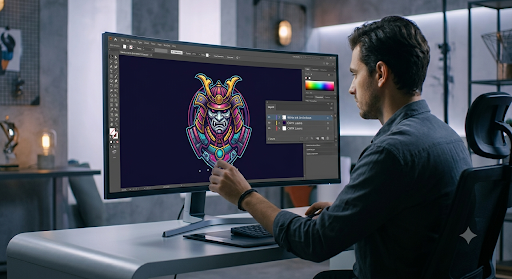
At first, you have your design file in software like Adobe Illustrator or Photoshop. Then, you put it in RIP (Raster Image Processor) software. This software separates the color layers and instructs the printer how exactly to apply the inks of colors CMYK, as well as white ink below. White ink is what makes colors “pop” on dark materials. Otherwise, colors look very pale on anything other than white or light colors.
Step 2: Printing onto the PET Film
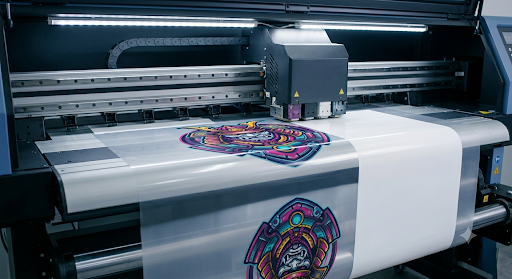
First, the printer prints the CMYK color layers and then the white ink layer on top. Actually, this is contrary to what you might think. The white layer is the base when the film is transferred to fabric. The film here is the PET film, which is a polyester-based sheet that keeps the ink before transfer.
Step 3: Applying the Hot-Melt Adhesive Powder
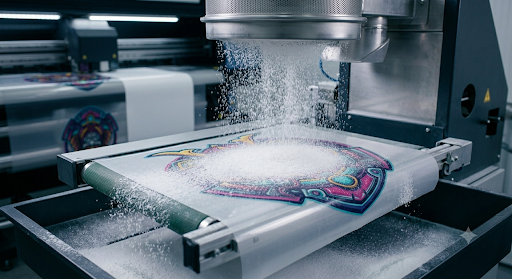
Immediately after printing, when the ink is still wet, you sprinkle the film with hot-melt powder. This powder can only stick to wet ink. In fact, it is the glue that bonds the design with the fabric when the heat transfer is done. The application of powder evenness is also very important here. If you go overboard, you will have a heavy coating, and if you do not apply enough, the print will not be properly bonded.
Step 4: Curing the Powder
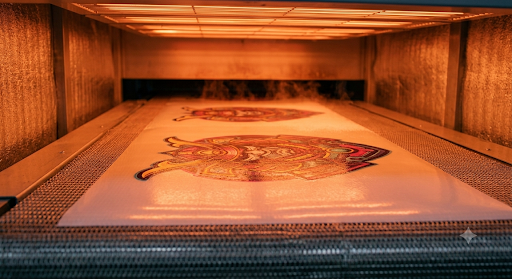
Through a curing oven, you pass the coated film that way or simply hold a heat press over it. The heat fuses the powder into the ink layer so that the transfer sheet becomes one single piece. A design ready for pressing is held by the film. At this point, you can put the transfer aside and apply it at a later time. This is even a huge gain production-wise.
Step 5: Heat Transfer onto the Fabric
Put the cured film face down on the garment and then press it with a heat press (usually at around 300°F to 325°F for 15 to 20 seconds). After that peel. You have two choices at the moment:
Hot peel: The film is peeled just after pressing and while still hot. Faster production speed.
Cold peel: After first cooling, the film is peeled. Generally produces a slightly smoother finish.
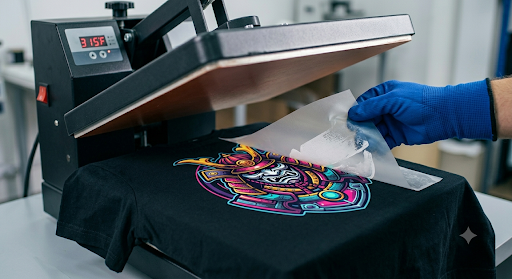
The one you do will depend on your film type and the finish you want. Most manufacturers will tell you which method works best for their film, also.
What Supplies and Equipment Do You Need for DTF?
If you want to start DTF printing, you will need a few specific pieces of equipment. You do not have to buy all of them on the first day if you plan to outsource printing. But, if you want to print in-house, here is what the setup looks like.
The DTF Printer
There are two main options here. Dedicated DTF printers are designed to print CMYK and white inks simultaneously from the start. Commercial-grade models are available from well-known brands like Epson, Roland, and Mimaki. The second option is a converted desktop printer—this will commonly be an Epson EcoTank that has been modified to handle DTF ink and film. Converted printers are cheaper initially, but they need more maintenance and have lower output.
DTF Inks
DTF requires the use of special pigment-based inks—CMYK colors—in addition to separate white ink. Inkjet inks that are used for normal printing will not work. Among the three colors of ink, the white ink is the most challenging since it settles and clogs more quickly, which is a reason why maintenance is important.
PET Film
This is the medium that your print gets transferred onto. It is available in rolls or as cut sheets. Film thickness and finish (matte or glossy) affect the final look and feel of the transfer.
Hot-Melt Adhesive Powder
Adhesive powder that is fine enough to stick to wet ink and forms a bond between the transfer and fabric. It is available in fine and coarse grades. Fine powder is especially good for intricate designs. Coarse powder gives a slightly thicker bond, which is more suitable for heavy fabrics.
Curing Oven or Heat Press
If you have a dedicated heat-curing oven, it is the best option for melting powder. Sometimes, a heat press in curing mode is used by small shops for starting out. Ideally, it gives uniform heat to the entire transfer without damaging the film.
RIP Software
This type of software helps handle the white ink layer, control color profiles, and also communicate with the printer. Industry-standard DTF options of Cadlink Digital Factory and Maintop are often chosen. Compatible RIP options are usually recommended by the printer manufacturer.
DTF vs. DTG vs. Screen Printing: Which is Better?
Each method has a place depending on your order volume, fabric type, and budget. Here is a side-by-side look.
DTF vs. DTG is basically a question of the type of fabric being printed on. DTG is limited to mostly cotton fabrics, whereas DTF can be done on polyester, nylon, denim, leather, and blended fabrics. Also, DTG needs a pre-treatment spray on dark fabrics, which is an extra step in both time and money. On the other hand, DTF does not even need pre-treatment.
When it comes to DTF vs. screen printing, the issue is one of volume. Screen printing is more economical at higher quantities. However, for small quantities or multi-color complicated designs, DTF is cheaper and faster both ways.
The Pros and Cons of DTF Printing
DTF is no exception to the rule that no printing method is perfect. It has real advantages and disadvantages. Do your homework before you decide.
The Pros
It is compatible with almost any fabric. That is cotton, polyester, nylon, spandex, leather, canvas, you name it—DTF can be done on all these without any further changes.
You do not have to do pre-treatment. It means that you save time and also the cost of pre-treatment sprays.
Strong and elastic. DTF prints stretch along with the fabric. They are never cracking after washing like the old plastisol screen prints sometimes do.
Short to zero runs. For printing one item, the cost per unit is practically the same as for twenty. That makes this technology spot on for print-on-demand models.
Transfers can be pre-made. This means you can print and cure transfers in advance and press them later on. It is a great way to speed up order fulfillment significantly.
The Cons
Hand feel. Compared to DTG or water-based screen printing, DTF prints have a slightly plastic-like texture. Most customers either do not notice it or do not care, but it is there.
White ink maintenance. White ink is prone to settlement. If you are not printing, you continuously have to agitate the white ink lines daily. If you don't, the printheads get clogged.
Ventilation requirements. The paint powder curing process creates fumes. Without a proper exhaust system or air purifier, which is not an option but a safety requirement, it simply would not work.
Film waste. There is a piece of used PET film after each transfer that is not recyclable via the usual channels, which is a green issue.
Is DTF Printing Profitable? A Quick Cost Analysis
The financial figures seem to be most compatible with small to mid-size businesses. Here is a pretty candid look.
A standard DTF print on a somewhat standard transfer sheet (approximately 12 x 16 inches) costs quite $1.50 -$3.00 to produce, considering all the materials like ink, film, and powder, plus power usage. A completed custom t-shirt with that print will be sold for a price anywhere between $25 to $45, depending on the customer's niche and brand positioning.
Therefore, your gross profit on the print only is approximately 60% to 80%, even before you take into account the cost of the garment and labor.
In a print-on-demand system where the supplier takes care of the production and ships straight to your customer, your margin will be lower—about 30% to 50%; however, you will not have any risk of inventory. Inkedjoy and other platforms make this model quite easily accessible to you without requiring you to have any equipment at all.
The Most Popular Questions About DTF Printing
Can you use a regular printer for DTF?
Not if you want it to work properly. Regular inkjet printers are not designed to handle DTF inks or PET film.
How long do DTF prints last in the wash?
Well-cured DTF printed transfers most probably can withstand about 50 wash cycles without the ink fading or cracking noticeably.
Is DTF printing eco-friendly?
It is, in some ways, more eco-friendly than screen printing — there is no water-heavy cleanup, and usually, there are no hazardous chemicals used in pre-treatment.
What is the difference between hot peel and cold peel DTF?
Hot peel means that after pressing, you take off the film immediately when it is still warm. Thus, you do not have to wait for the transfer to cool down. "Cold peel" means that you complete the transfer very well, and then you peel it off.
Ready to Start Printing with DTF?
DTF printing opens fabric options to you, gives minimal upfront investment, and a great profit margin that several other methods cannot match on a small scale. Whether you want to run your own equipment or use your print-on-demand partner, it is a mature technology, and custom apparel demand will never slow down as a trend.
Inkedjoy is an online store where you can get DTF print-on-demand production without even buying one piece of equipment. Just scroll through their product catalog, upload your designs, and start selling custom apparel to customers worldwide — with no inventory and no upfront print costs.
Have you made up your mind to launch a DTF-driven apparel brand? Share the niche you are targeting.
Read More
Written by Josie
Josie is a skilled marketing specialist with expertise in TikTok, Facebook, and YouTube. She excels at audience growth and social media account management, consistently delivering valuable insights across key social marketing channels. Her strategic approach helps brands build meaningful engagement and expand their digital presence effectively.